FAQ
How can I contact the developers?
What are the minimum system requirements?
See our detailed guides:
- PMM hardware and system requirements for complete specifications
- Setting up PMM Server for server installation
- Setting up PMM Client for client setup
What are the minimum system requirements?
See our detailed guides:
- PMM hardware and system requirements for complete specifications
- Setting up PMM Server for server installation
- Setting up PMM Client for client setup
Quick reference: Typical deployment (up to 30 nodes)
Server requirements:
- CPU: 4 cores (must support SSE4.2)
- Memory: 8 GB
- Storage: 100 GB (~1 GB per node per week)
Client requirements:
- Storage: 100 MB
- Architecture: x86_64 and ARM64 supported
For larger deployments (200+ nodes) or extended retention, see Hardware and system requirements for detailed sizing guidance.
How can I upgrade from version 2?
PMM 3 introduces significant architectural changes that require gradual transition from PMM 2. For detailed instructions, see Upgrade from PMM2.
Why does the PMM installation script fail during Docker installation?
If you encounter errors such as ERROR: Unsupported distribution when running the, follow these steps:
- Install Docker manually.
- Run the PMM Easy-install script again.
Retention
To control data retention, go to PMM Configuration > Settings > Advanced Settings > Data retention to adjust the value in days. See also Configure data retention.
How are PMM Server logs rotated?
PMM Server embeds multiple components, like Victoria Metrics, Query Analytics, Grafana, managed, PostgreSQL, ClickHouse, etc. (components). All PMM Server component logs are rotated by supervisord.
The components’ log rotation settings are stored in *.ini files within the /etc/supervisord.d directory. Those settings define both the maximum size of a log file and the number of log files to keep. The log rotation takes place once the log file reaches its maximum size.
What privileges are required to monitor a MySQL instance?
SELECT, PROCESS, SUPER, REPLICATION CLIENT, RELOAD
Can I monitor multiple service instances?
Yes.
You can add multiple instances of MySQL or any other service to be monitored from the same PMM Client.
To do this, you provide a unique port and IP address, or a socket for each instance, and specify a unique name for each. (If a name is not provided, PMM uses the name of the PMM Client host.)
For example, to add MySQL monitoring for two local MySQL servers:
pmm-admin add mysql --username root --password root instance-01 127.0.0.1:3001
pmm-admin add mysql --username root --password root instance-02 127.0.0.1:3002
See also pmm-admin add mysql.
Can I rename instances?
Yes, by removing and re-adding with a different name.
When you remove a monitoring service, previously collected data remains available in Grafana. However, the metrics are tied to the instance name. So if you add the same instance back with a different name, it will be considered a new instance with a new set of metrics. So if you are re-adding an instance and want to keep its previous data, add it with the same name.
Can I add an AWS RDS MySQL or Aurora MySQL instance from a non-default AWS partition?
By default, the RDS discovery works with the default aws partition. But you can switch to special regions, like the GovCloud one, with the alternative AWS partitions (e.g. aws-us-gov) adding them to the Settings via the PMM Server API.
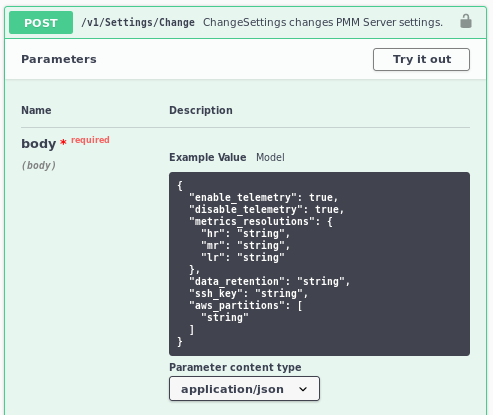
To specify other than the default value, or to use several, use the JSON Array syntax: ["aws", "aws-cn"].
What resolution is used for metrics?
The default values (in seconds):
| Preset | Low | Medium | High |
|---|---|---|---|
| Rare | 300 | 180 | 60 |
| Standard | 60 | 10 | 5 |
| Frequent | 30 | 5 | 1 |
| Custom (defaults) | 60 | 10 | 5 |
See also Metrics resolution.
How do I set up Alerting?
When a monitored service metric reaches a defined threshold, PMM Server can trigger alerts for it using embedded Grafana Alerting functionality.
For this, you must configure alerting rules that define conditions under which an alert should be triggered, and the contact points used to send the alert (e.g. email).
Percona templated alerts enable you to create alerts based on built-in or custom templates to simplify the alert setup process. Grafana managed alerts allows attaching rules to your dashboard panel and enables you to create more sophisticated alerting rules. In addition, it can be easier to manage installations with a large number of hosts. This additional flexibility comes at the expense of simplicity.
See also Grafana Alerting.
How do I use a custom Prometheus configuration file?
Normally, PMM Server fully manages the Prometheus configuration file.
However, some users may want to change the generated configuration to add additional scrape jobs, configure remote storage, etc.
From version 2.4.0, when pmm-managed starts the Prometheus file generation process, it tries to load the /srv/prometheus/prometheus.base.yml file first, to use it as a base for the prometheus.yml file.
The prometheus.yml file can be regenerated by restarting the PMM Server container, or by using the SetSettings API call with an empty body.
See also API and Percona blog: Extending PMM’s Prometheus configuration.
How to troubleshoot an upgrade?
See Troubleshoot update.
What are my login credentials when I try to connect to a Prometheus Exporter?
- User name:
pmm - Password: Agent ID
PMM protects an exporter’s output from unauthorized access by adding an authorization layer. To access an exporter, you can use pmm as a user name and the Agent ID as a password. You can find the Agent ID corresponding to a given exporter by running pmm-admin list.
See also pmm-admin list.
How to provision PMM Server with non-default admin password?
Currently, there is no API available to change the admin password at deployment time. However, you can use the GF_SECURITY_ADMIN_PASSWORD environment variable to set the password for the default admin user.
docker run -d --name pmm-server \
  -e GF_SECURITY_ADMIN_PASSWORD="your_secure_password" \
  -p 443:8443 \
  percona/pmm-server:latest
How to change the PMM password for the default admin user?
Once PMM has started, you can use either of the following to change the password (assuming your container is named pmm-server):
-
a helper script
change-admin-password:docker exec -t pmm-server change-admin-password your_secure_password -
or a code snippet:
PMM_PASSWORD="mypassword"
echo "Waiting for PMM to initialize to set password..."
until [ $(docker inspect -f '{{.State.Health.Status}}' pmm-server) = "healthy" ]; do sleep 1; done
docker exec -t pmm-server bash -c  "grafana cli --homepath /usr/share/grafana --config=/etc/grafana/grafana.ini admin reset-admin-password $PMM_PASSWORD"
How to use a non-default listen-port for pmm-admin?
If you configure the PMM agent to use a non-default listen-port, for pmm-admin to communicate with the agent, use the global flag --pmm-agent-listen-port=LISTEN_PORT.
--pmm-agent-listen-port=LISTEN_PORT
Example: To use the listen-port 8000
pmm-admin --pmm-agent-listen-port=8000 add postgresql --username=pmm-agent --password=pmm-agent-password --query-source=pgstatmonitor nameofpostgres
If you are using OVF/AMI, you can change the default password through SSH by using the following command:
change-admin-password <new_password>
How does PMM handle personal and confidential data?
Read our Privacy Policy to learn how PMM manages personal and confidential data. More technical details can be found in Data handling in PMM.
Why am I getting a “User already exists” error when logging into PMM?
Starting with PMM 2.38, we implemented a security fix for CVE-2023-3128. PMM now requires a unique user ID from your identity provider during authentication. If your provider doesn’t supply this identifier, you’ll see a “User already exists” error on subsequent login attempts.
Solution
Use a Percona Account to log into PMM. This is the recommended and most secure authentication method, as Percona Accounts fully support unique user IDs.
Workaround
If you must use a third-party identity provider without unique ID support, set this environment variable on your PMM container:
GF_AUTH_OAUTH_ALLOW_INSECURE_EMAIL_LOOKUP=1
Caution
This workaround reduces security and should only be temporary. We recommend either switching to a Percona Account or using an identity provider that supports unique user IDs. Ensure your provider implements unique ID fields to maintain long-term security.